
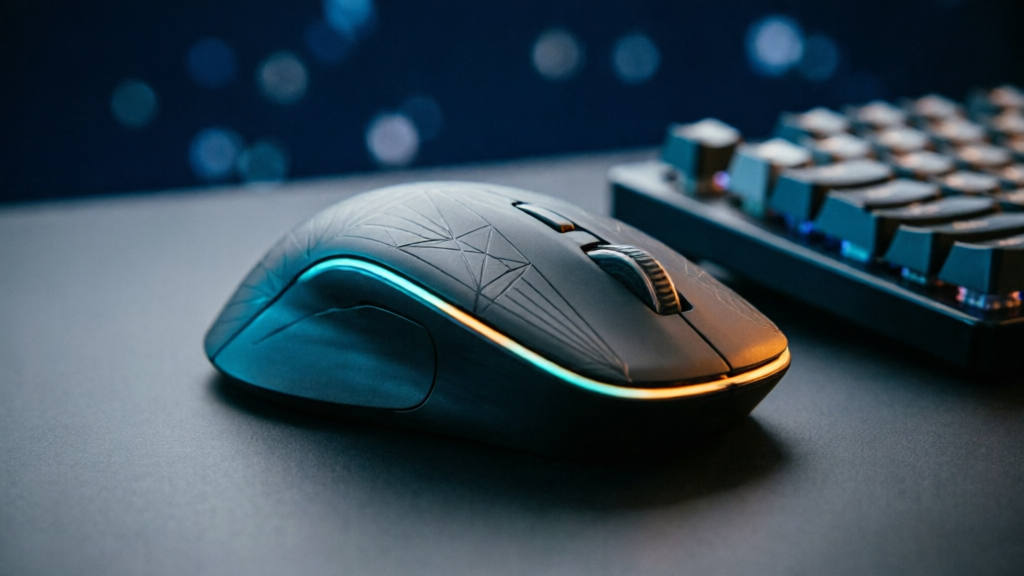
The MX Master 4 Developer Edition Is the Same Mouse, Just Etched
Logitech opened pre-orders this week for the MX Master 4 Developer Edition, and after reading through every detail of the announcement, I want to be straight with you before you reach for your wallet: nothing inside this mouse is different. Same sensor, same wheels, same $119.99 price tag as the standard model. What you get for your developer loyalty is a set of laser-etched Easter eggs on the shell. That sounds like a ripoff until you understand what else shipped with this mouse line, because the actual story here is not the etching. It is haptic feedback finally arriving as a first-class feature on Windows 11.
What the Developer Edition actually adds
The cosmetic package, per Logitech's listing and Windows Central's coverage: syntax annotations and markup tags laser-etched into the body, plus a row of dates along the bottom plate. The engravings include 09.17, a nod to the Linux kernel's release, and !04.01 for World Backup Day. Windows Central's reviewer, whose regular MX Master 4 lives in a mostly black accessory setup, described it as a welcome hit of color.
Shipping starts October 31, 2026. Pre-orders are live on Logitech's site right now. If you were already eyeing an MX Master 4 and you happen to be the kind of person who gets a small jolt of recognition seeing markup tags etched on hardware, this is a free upgrade. Free is doing real work in that sentence, though, because Logitech could easily have charged $20 more for the paint job and nobody outside of a Reddit thread would have complained.
The hardware is the mouse you already know
Under the etched shell sits the same MX Master 4 that Tom's Guide nearly perfect-scored back in February and that succeeded the MX Master 3S, the default productivity mouse for years. The specs worth repeating:
- Adjustable DPI from 2,000 to 8,000
- The signature MagSpeed scroll wheel and a dedicated thumb wheel for horizontal scrolling
- A touch-sensitive strip on the side for gesture controls, plus a button that opens Logitech's control ring overlay
- Per-application button remapping, so the side buttons can mean "copy" in your editor and "next tab" in your browser
- Multi-device pairing and Flow, Logitech's scheme for drifting one mouse across several computers
Nothing changed since launch, and the important part: the haptics did not require new hardware either. Every MX Master 4 got them through a firmware update.
Windows 11 haptic signals are the real story
In May 2026, Logitech shipped native haptic integration with Windows 11, making the MX Master 4 one of the first mice, and one of the first devices at all, to support the operating system's new haptic signal system. The others in the first wave: the Surface Laptop 8, and Microsoft's redesigned Surface Mouse, its first new flagship mouse in roughly a decade, which also carries a built-in haptic motor and a configurable action button.
Here is how it behaves. When you flip a toggle in the Settings app, the mouse gives a small, crisp bump. Aligning objects in PowerPoint produces a tactile tick as edges snap. Switching virtual desktops, dragging a slider, hitting the end of a scroll detent: each gets its own little physical punctuation mark. Windows now treats these haptic signals as system-level events that supported hardware renders, rather than as vendor-specific parlor tricks locked inside one driver.
Windows Central's Zac Bowden wrote after first using the feature that Windows "has sorely lacked niceties like this" in recent years, and that he is glad Microsoft added them even while admitting the feature is not necessary. That is exactly the right read. Nobody's ticket throughput changes because a toggle buzzes. But read any ergonomics research on confirmation feedback and you find the same finding on repeat: humans trust an action more when the interface confirms it through a second sensory channel. Double-click anxiety, the "did that register" hover-check, the re-click that opens a second window you now have to close: all of that micro-doubt has a cost, and you pay it dozens of times a day without noticing.
Why a bump in the hand matters to people who code
Developers are an unusually good market for tactile feedback for one mundane reason: we live in state machines and we constantly wonder which state the machine acknowledged. You switch between four virtual desktops and lose track of which one has the terminal. You toggle a setting in some config UI and the page gives no confirmation. You drag a breakpoint, resize a split pane, scrub a timeline. A haptic tick on desktop change tells your body where you are without making your eyes leave the code. If it saves you the glance, it is doing something.
The per-app remapping layer is the other half of the DX pitch, and it predates the haptics. Logitech's software lets you bind different button and gesture behaviors to individual applications. The classic developer setup: thumb wheel as timeline scrub in your IDE, as horizontal scroll in the browser, as brush size in a design tool. If you have ever configured this, you know it takes an afternoon and saves a cursor-hand every quarter. If you have not, the Developer Edition will not make that decision easier or harder.
For context on where this is all heading: Apple normalized trackpad haptics years ago, to the point that a Mac trackpad click that was purely mechanical now feels quaint. Windows spent that era shipping mice that clicked like mice always had. The haptic signal API is Microsoft's belated bet that feedback belongs in the operating system, not in each vendor's driver, which is the architectural choice that decides whether this becomes a ecosystem feature or stays a demo. Third-party hardware support is the thing to watch over the next year. Two mice and a laptop is a first wave, not a wave.
Who should buy this, and who should walk
Buy it if you want an MX Master 4 anyway and the etching makes you smile. The price is identical to the standard model, which is the correct way to sell a cosmetic edition. The Reddit launch thread spent more time arguing about whether developers deserve branded hardware than about the mouse itself, which tells you the etching is doing its job as identity signaling. Fine. We buy mechanical keyboards with louder switches than we need.
Skip it if you already own an MX Master 4. The firmware update gave you every haptic signal, and the etchings are the only delta between your mouse and this one. If you are on macOS or Linux, the Windows 11 haptic signals simply do not exist, so you would be buying a very good mouse without its headline feature. And if you were hoping for a new sensor or a quieter switch, there is none: this is a paint release wearing a launch announcement.
The number that matters here is the one that did not move: the price. Same $119.99, same specs, shipping October 31. The actual hardware story of this release is a firmware API that anyone with an MX Master 4 already has for free.
Comments