
Building gollama: A Single-Binary llama.cpp Instance Manager in Go
I've been running local LLMs on a dual-GPU setup (RTX 3060 12GB + RTX 2080 8GB) for months now. The hardware works, but the software layer has always felt like a compromise. Ollama hides llama.cpp flags behind abstractions. llama.cpp's own server is powerful but CLI-only and unforgiving. You want to tweak tensor splits, enable flash attention, or test MTP speculative decoding — good luck finding where those settings live in the tooling.
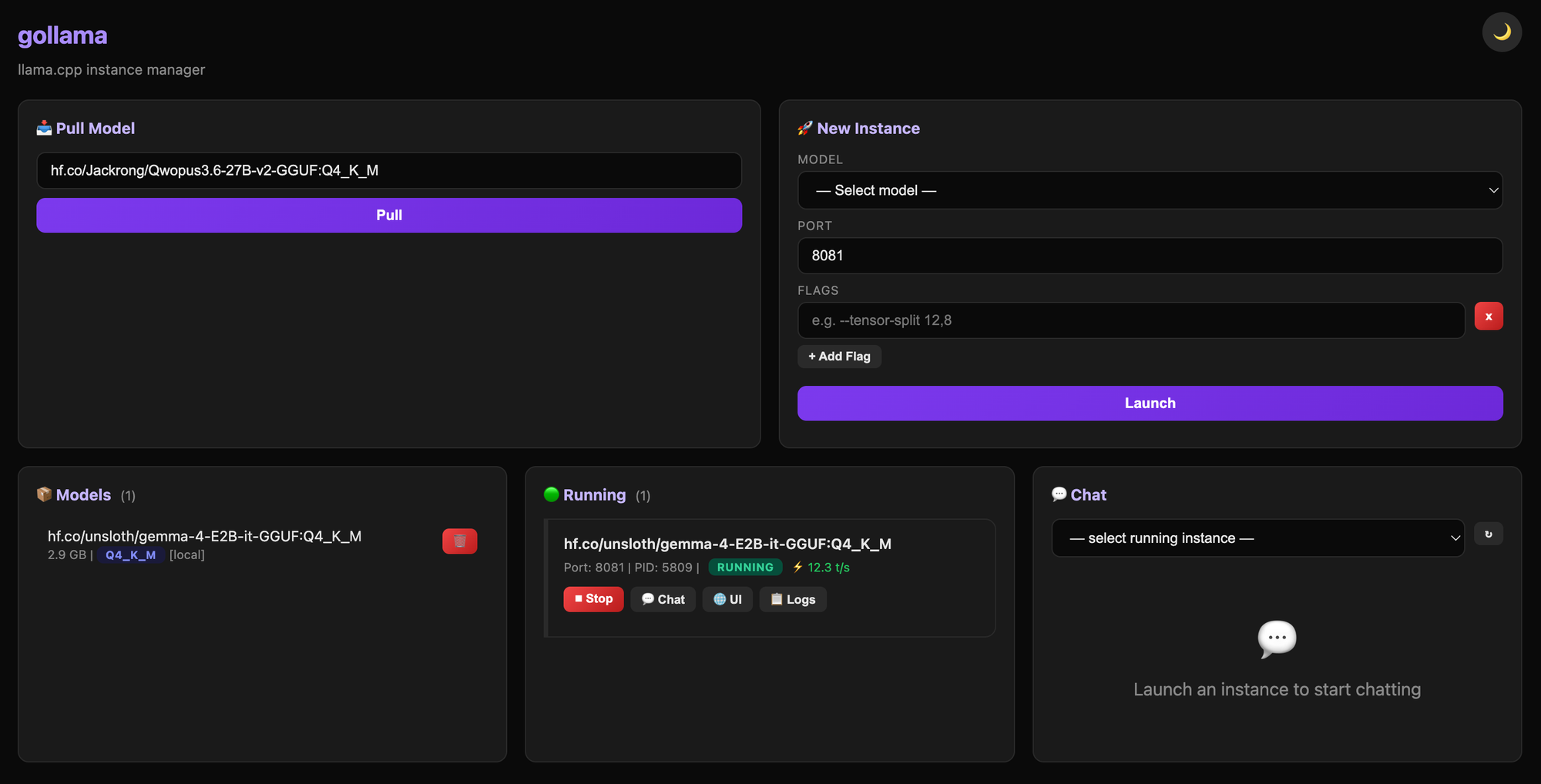
So I built gollama. It's a single statically-linked Go binary that wraps llama-server and gives you every parameter with zero dependencies. No Docker, no Python. Just one binary that downloads models from HuggingFace, manages multiple instances, and ships a web UI for everything.
The Problem: Abstractions That Become Walls
For multi-GPU inference, the gap between what llama.cpp supports and what tools expose is enormous. Here's what you need to control in practice:
- Tensor split across GPUs. With a 12GB + 8GB setup, the default auto-split rarely works well for 30B+ models. You need manual
--tensor-split 12,8. - KV cache quantization.
--cache-type-k q4_0can reclaim hundreds of MB without meaningful quality loss — but Ollama doesn't expose this. - MTP speculative decoding.
--spec-type draft-mtpcan double throughput on the right hardware, but again: buried or hidden. - Graph splitting and USE_GRAPHS. Understanding when to disable CUDA graphs for certain layer configurations is a llama.cpp internals question, not a user-facing toggle in most tools.
The existing options were either too high-level (Ollama's abstractions) or too low-level (raw llama-server with no instance management). gollama sits in between: it handles the boring parts (model downloads, process lifecycle, GPU detection) while exposing every flag.
Why Go? Why Single-File?
The architecture decision came down to one requirement: the binary must work everywhere without a build environment.
Go is the obvious choice for this. Cross-compilation is trivial — a single GOOS=linux GOARCH=amd64 go build produces a binary that runs on any Linux box. No shared libraries, no runtime dependencies, no pip install. For self-hosters who manage their own hardware (which is the primary audience), this matters enormously.
The single-file architecture means the entire project — CLI, web UI frontend (static HTML/CSS/JS embedded via Go's embed directive), REST API, and process management logic — lives in one .go file. This isn't for code golf; it's because the tool is a wrapper around another binary. The complexity is in orchestration, not domain logic. A single file keeps the mental model flat.
No Docker was an explicit choice. llama.cpp instances don't need container isolation — they need GPU access, which means host-level device nodes and NVIDIA/ROCm driver exposure anyway. Wrapping a GPU-bound process in another abstraction layer (Docker) adds complexity without solving a real problem for this use case.
Architecture Under the Hood
At its core, gollama is a process manager with a REST API:
┌─────────────┐     ┌──────────────┐     ┌──────────────┐
│   CLI       │     │  gollama     │     │ llama-server │
│ (pull/run/  │────▶│  (Go binary) │────▶│  (instance N)│
│  serve/ps)  │     │              │     │              │
└─────────────┘     │  ┌─────────┐ │     └──────────────┘
                    │  │ Web UI  │ │
                    │  │ (embed) │ │     ┌──────────────┐
                    │  └─────────┘ │     │ llama-server │
                    │              │     │  (instance M)│
                    └──────────────┘     └──────────────┘
The flow for gollama run:
- Pick a GGUF model from the local index (
~/.gollama/index.json) - Resolve
llama-serverbinary path (auto-downloaded viagollama updateor built from source) - 3. Construct the full llama-server command line with all provided flags
- Spawn the process, pipe stderr to
~/.gollama/logs/port-NNNN.log - Register in the running instances map (port → PID → config) for later
ps/stop
The web UI is served from an embedded directory. No external assets, no CDN — the entire frontend (HTML, CSS, JavaScript) is compiled into the binary via Go's //go:embed directive. The chat panel proxies WebSocket connections to running llama-server instances, sidestepping CORS entirely.
Technical Decisions Worth Noting
GPU auto-detection and binary selection. Running gollama update prompts the user to choose CPU, CUDA, ROCm, or Vulkan. For CUDA on Linux, pre-built binaries don't exist on the official llama.cpp releases page, so gollama falls back to building from source with the detected GPU architecture flags. This was non-trivial because different NVIDIA architectures need different compute targets (-gencode arch=compute_86,code=sm_86 for Ada vs compute_75,code=sm_75 for Turing).
.so extraction from archives. Some llama.cpp releases ship shared libraries alongside the server binary. Extracting the right .so files from release archives without pulling in dependency chains required careful handling of archive formats and path resolution.
Progress bars during model downloads. HuggingFace's hf.co URLs can serve multi-GB GGUF files. Implementing a terminal progress bar (using the github.com/schollz/progressbar/v3 package) with resume support for interrupted downloads was one of the more involved pieces — it needed to track byte offsets, handle chunked responses, and update the TTY atomically without tearing.
Dark/light theme toggle in the web UI. The frontend uses CSS custom properties scoped to a data-theme attribute on the root element. Toggle persists via localStorage. No framework — just vanilla JS that swaps the attribute and lets CSS cascade handle the rest:
:root {
  --bg: #ffffff;
  --text: #1a1a1a;
  --border: #e0e0e0;
}

[data-theme="dark"] {
  --bg: #0d1117;
  --text: #e6edf3;
  --border: #30363d;
}
Lessons from llama.cpp Internals
Building gollama forced me to understand llama.cpp more deeply than I expected. A few insights:
Graph splits matter more than most guides suggest. The --n-gpu-layers 99 flag doesn't mean "offload everything." It means "split the graph at layer 99," and llama.cpp decides how to distribute that across GPUs based on available VRAM. For multi-GPU setups, understanding the graph partitioning logic — which layers go where, when CUDA graphs are enabled — is essential for avoiding OOM errors on one GPU while another sits idle.
USE_GRAPHS control is critical for debugging. Disabling USE_GRAPHS (via --no-mmap or runtime flags) can resolve silent inference corruption that manifests as garbled output. This isn't a llama.cpp bug — it's a limitation of CUDA graph capture with dynamic layer counts. Knowing when to disable it is a production skill.
MTP speculative decoding has real constraints. --spec-type draft-mtp requires a compatible draft model and specific hardware support. It won't work on every GPU, and the speedup varies wildly depending on the base model's architecture. But when it works, throughput improvements of 2x+ are real — not marketing numbers.
What's Next
The current feature set is solid for self-hosted use: multi-GPU inference with precise control, model management from a browser, and a CLI that doesn't hide anything. Upcoming priorities include:
- Multi-host support — distribute instances across machines on the same LAN
- Health checks with auto-restart for crashed instances
- REST API documentation (OpenAPI spec)
- Preset management for saving/loading flag configurations
The project is at github.com/majidkorai/gollama. If you're self-hosting LLMs and tired of tools that abstract away the parameters you actually need to tune, it might be worth a look.
Comments