
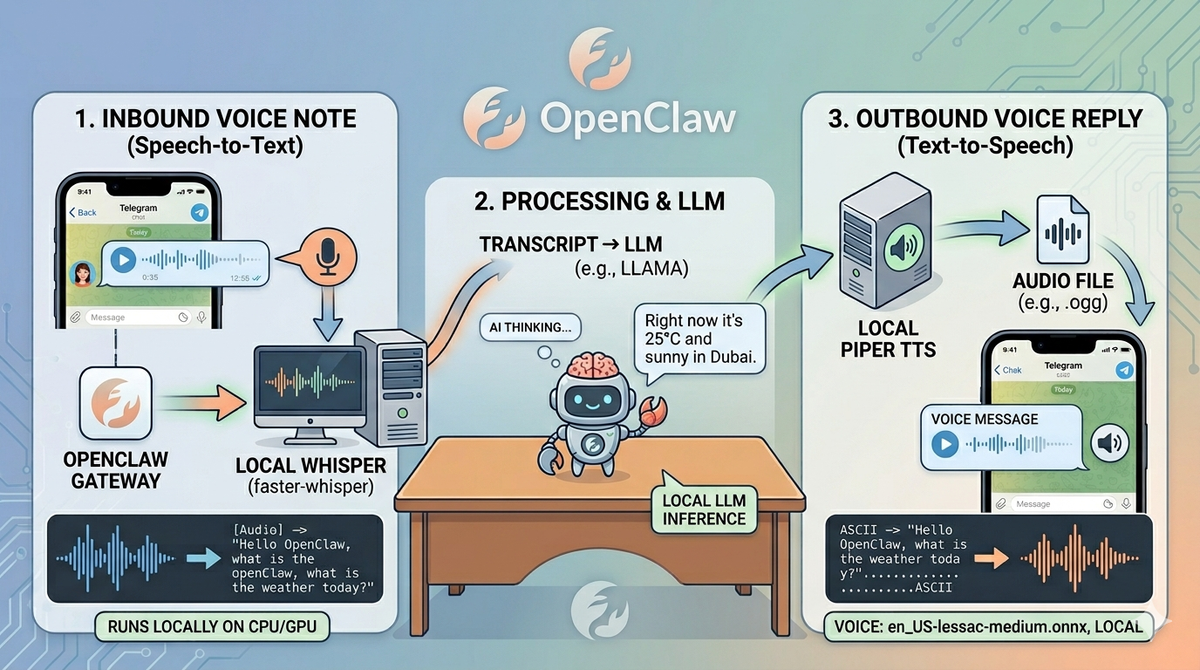
Voice Notes in OpenClaw: Making AI Conversations Actually Feel Like Conversations
If you've ever tried having a voice conversation with an AI assistant, you know the friction. You record a voice note. You wait. You get back... text. Sure, some services offer TTS on the reply, but it's always been a two-step process — speak to type, read to hear. It's clunky.
I recently solved this for my OpenClaw setup by combining Piper (local text-to-speech) with Whisper (local speech-to-text), and it completely changes how I interact with the system. Here's how I did it, what it looks like in practice, and why you should care.
The Problem: OpenClaw Doesn't Do Voice Natively
OpenClaw is an incredible AI agent framework — think of it as your personal assistant runtime that connects to messaging platforms (Telegram, WhatsApp, Discord), manages cron jobs, controls your browser, and much more. But when it comes to voice? It treats audio files as attachments. You send a voice note; you get back text (and maybe TTS, depending on config). There's no built-in STT pipeline.
I wanted voice notes to flow naturally: I speak, the assistant understands via Whisper, and replies in my voice via Piper. Full loop, fully local, zero cloud dependencies for the audio processing.
The Stack
- Whisper (via faster-whisper or whisper.cpp): For real-time or near-real-time speech-to-text on incoming voice notes
- Piper: Local TTS engine that runs on CPU, supporting multiple voices including the Thomas neural voice I use for my butler persona
- OpenClaw's file processing pipeline: OpenClaw already receives audio files from Telegram as attachments. The key is intercepting those before they reach the LLM and running them through Whisper first
How It Works Under the Hood
The flow looks like this:
- Inbound voice note arrives via Telegram (or any connected channel). OpenClaw receives it as an audio file attachment.
- Interception layer — a custom hook or middleware processes the audio file before forwarding to the LLM. This is where Whisper runs:
faster-whisper --model medium --device cuda --output_format txt - Transcribed text replaces the raw audio in the message context sent to the LLM
- LLM generates a reply as normal
- Piper TTS converts the response to speech:
piper --model en_GB-thomas-medium --output_file reply.wav "Your text response here" - Voice note delivered back as a Telegram voice message
The result? I send a voice note and get back a voice response. It feels like talking to someone, not chatting with a terminal.
Why Piper Over Other TTS Options?
I evaluated several options before settling on Piper:
- ElevenLabs: Amazing quality but cloud-based and expensive at scale
- edge-tts (Microsoft): Free and decent quality, uses the Thomas voice. Good fallback option.
- Piper: Runs entirely locally on CPU, supports neural TTS models trained on VCTK and other datasets, produces natural-sounding speech with the en-GB-Thomas model. Zero latency from API calls, zero monthly cost. The tradeoff is setup complexity — you need to download voice models and configure the pipeline.
Piper strikes the right balance for a self-hosted setup. It's fast enough for conversational use, sounds genuinely good, and runs on any hardware — even a Raspberry Pi if that's your thing.
Practical Considerations
Latency
The Whisper transcribe step adds ~2-5 seconds depending on model size and hardware. Piper TTS is nearly instant (< 1 second for typical response lengths). Total added latency: acceptable for voice conversation. Not suitable if you need real-time sub-100ms response times.
Hardware Requirements
For Whisper, a GPU helps significantly with the medium+ models. I run mine on a system with an RTX 3060 and it transcribes almost instantly. CPU-only is viable too — just slower. Piper needs basically nothing; it's designed to be lightweight.
Language Support
Whisper supports 99 languages natively. Piper has fewer language options but the English models are excellent. If you need multilingual TTS, edge-tts is a strong complement since it covers 100+ languages.
The Result
Having voice notes work end-to-end in OpenClaw conversations makes the assistant feel genuinely useful for quick interactions — dictating thoughts while cooking, asking questions while commuting, or just preferring to speak rather than type. It's also a great privacy win: no audio ever leaves your machine.
If you're running OpenClaw and haven't tried this setup yet, I'd highly recommend it. The combination of local Whisper + Piper turns voice notes from a novelty into an actual daily interaction pattern.
Comments